
Site Management
This page is generally only available to Administrators, but may also be available to Supervisors depending on the configuration of your VMS installation. The page allows for the creation and editing of details pertaining to VMS Sites.
Much like user accounts, sites cannot be deleted once they are created - they may only be disabled. This is to ensure the integrity of the audit trail for historic violations.
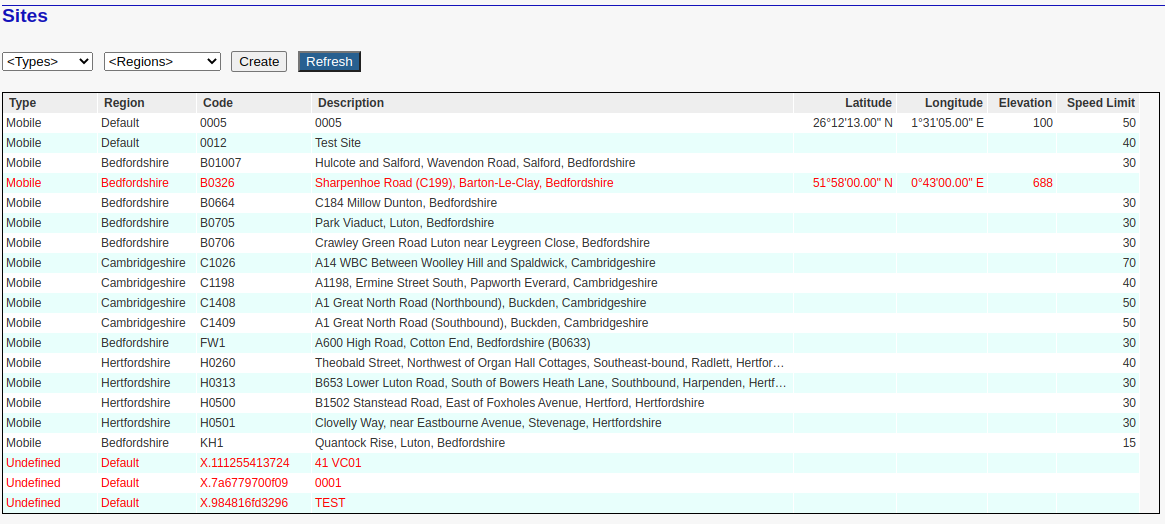
The properties of a site include the following:
Type: Sites fall into one of the following categories ...
Area denoting a general area such as a suburb or section of town.
Intersection denoting the intersection of two or more roads.
Mobile sites have two possible interpretations. They may be associated with offences/violations that have been acquired by a mobile 'in-car' system, or by hand-held equipment at a specific location.
Roadway denotes a length of roadway. For instance, 'Highway 119 between offramp 23 and highway 444'
School denotes a site for which special rules apply. This may result in a higher citation value than a regular site for the same excess speed margin.
Undefined denotes a site that has yet to be properly defined.
Region: This usually denotes a distinct geographic region that is monitored by a separate group of enforcement officers, but it may also denote sites whose adjudicated offences are 'exported' to distinct (different) back-office systems.
Code: This is a sequence of characters that uniquely identifies this site. This is also the code that is usually specified on the offence recording equipment (camera).
- Note that this code may include single spaces, but the VMS instance must be so configured.
You will notice that some 'Undefined' site codes such as X.111255413724. These are sites that were automatically created during the import of a batch of violations where either a violation site was unknown, or the OCR engine was unable to correctly read the site code. These denote temporary site codes will require renaming or must be merged into an existing site code. The details are described below.
Description: This describes the location of the site. Note that for some installations this description will also appear on the generated citations.
Latitude: This optional parameter defines the precise geographic latitude of the site location.
Longitude: This optional parameter defines the precise geographic longitude of the site location.
Elevation: This optional parameter represents the height in meters above sea level.
Speed Limit: The maximum allowed vehicle speed at this location.
You will notice that some sites are highlighted in red, indicating that the site is not fully defined.
Creating a new site
Simply click on the Create button and enter the site details in the edit fields that appear on the right of the site list. See below ...
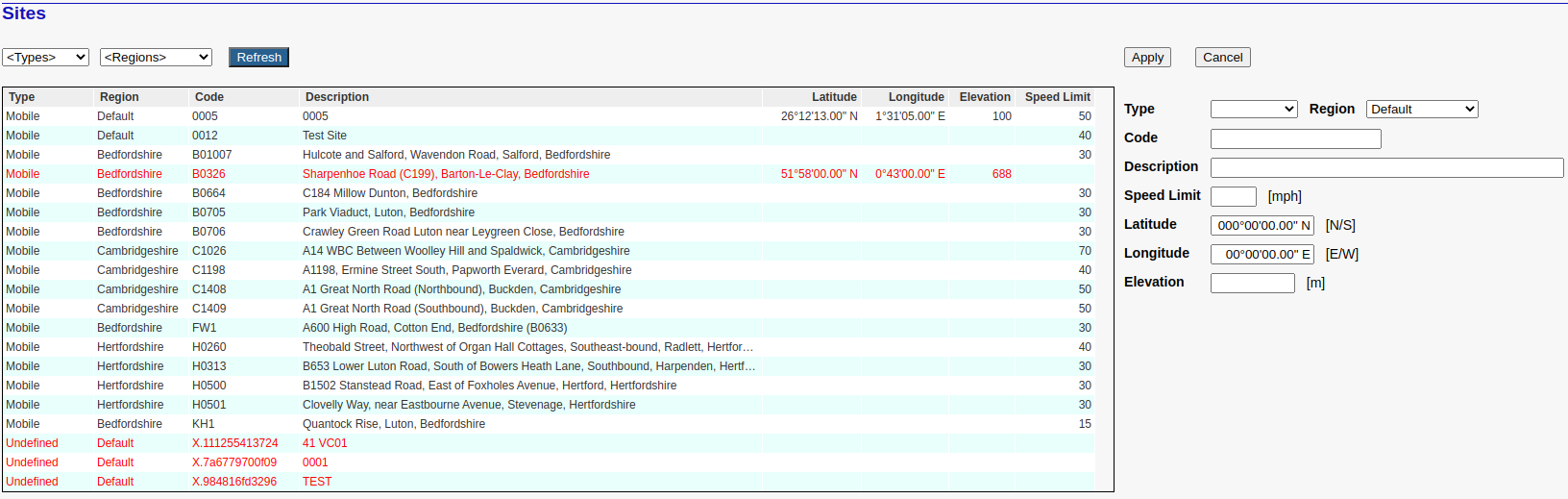
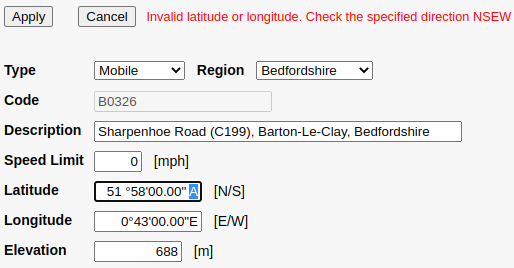
Once all the relevant details have been specified, click the Apply button to save. The site should now be listed in the main Site List Box. If you have made an error, the system will ask you to correct it. The following is just one example of such an error. In this case the user has specified an 'A' in the Latitude instead of an 'E' or 'W'.
Every site should have a valid Speed Limit. Ideally a valid Latitude and Longitude should also be specified, but occasionally this is not really practical. In these rare cases simply enter zeros for both parameters. Any site whose latitude and longitude are both zero is treated as if the location is not defined.
Note that sites with undefined Speed Limits will be flagged as 'alert' conditions by the State Of Health because it can lead to problems during exports to 'StarTraq' and/or 'Cubic'. If a site has no assigned speed limit then the VMS will attempt to use the speed limit defined on the cameras, but this is problematic because it may not have been correctly specified by the camera operator.
Editing a Site
Click on the required site in the Site List Box and then click the Update button. This will allow you to make the necessary changes. Upon completion just click the Apply button to save.
Renaming a Site Code
In the Site list click on the site that you wish to rename, and then enter the new code in the highlighted field on the right. Then click the Apply button. For example ...
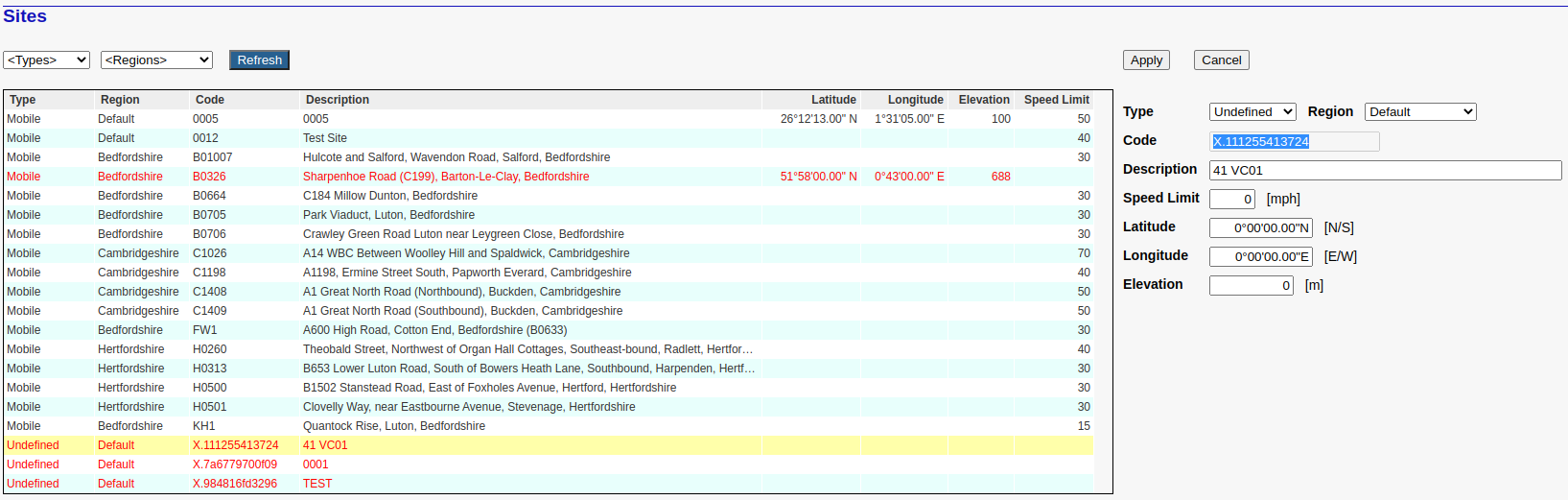
Note that renaming a site code is only possible if the specified target code does not already exist.
Merging two sites
Merging a site code has the effect of changing the site codes of all associated violations to that of the target site code - and effectively 'removing' the original site code. For example ...
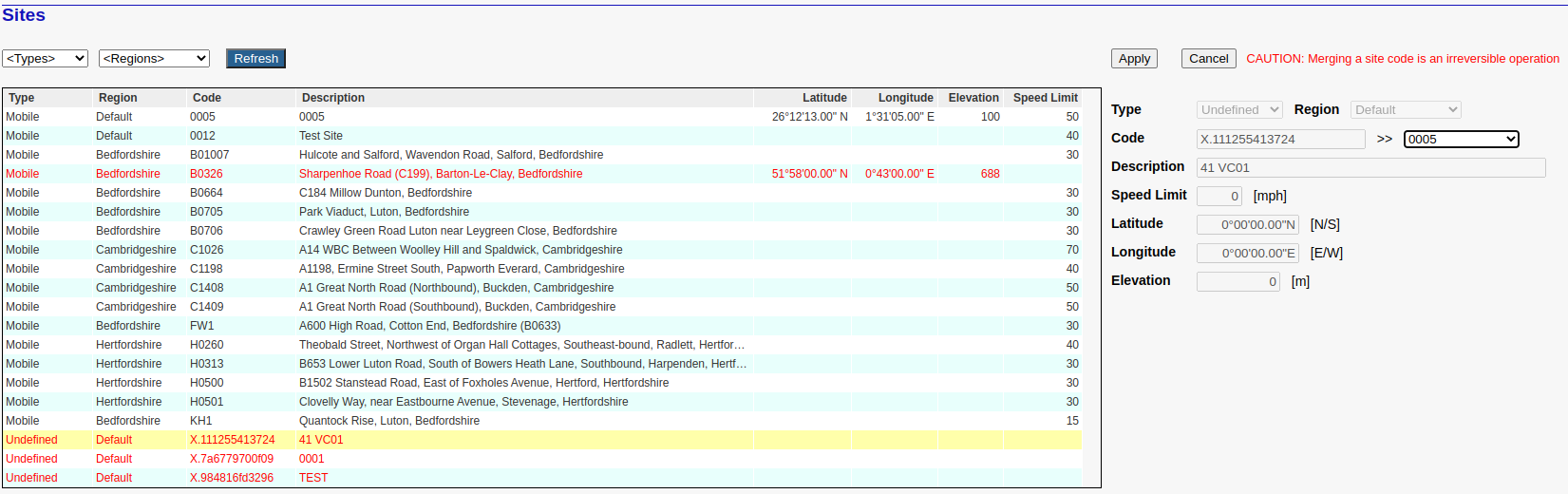
 Note that this is an irreversible operation and should be applied with due care.
Reserved Site Code Prefix 'X.'
It is sometimes necessary for the VMS violation import modules (satellites) to create automatic site codes for imported violations whose site codes have not yet been defined on the VMS system. For instance, a camera operator may have defined a 'new' site code '0076' on a camera when that site as not been defined on the VMS system itself. When uploading those violations to the VMS, the system will be unable to allocate these violations to any existing VMS site code, and must consequently create and use a unique 'temporary' automatic site code. The example below lists multiple such sites, all beginning with the characters 'X.' followed by a sequence of characters in the range '0' to '9' and 'a' to 'z'.
The reason for creating an 'X.' site rather than simply using the unexpected '0076' code (in this case) is to highlight the presence of a unexpected new site code so that the Administrator can take the appropriate action.
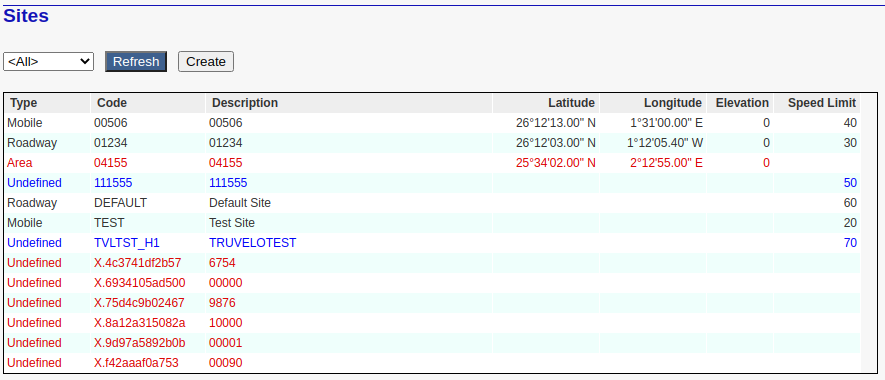
When this happens, it will be immediately obvious to the Adjudicators because of the characteristic site code prefix and also because the site type will always be set to Undefined. It is then the responsibility of the Administrator(s) or Supervisor(s) to use the editing option (above) to set the correct site type, and to rename or merge this automatically created site code with an existing site code.
Note that such sites will be automatically detected and flagged as 'Alert conditions' by the State Of Health because they should not be exported to 'StarTraq' and/or 'Cubic'. As a rule, the automatic VMS Export Scheduler will not export such violations, but under certain conditions it is possible for the Administrator to manually override this behaviour.
Locked Sites
You may notice that some sites are 'Locked', as will be indicated by the following display when the site is selected from the site list ...

This only applies to a limited set of sites defined during VMS system installation. This is necessary when there exists a policy to always include these sites (unedited) on any and all violation acquisition cameras (e.g. LaserCam4). These sites may only be updated by a VMS service engineer.