Observer
This page is only available to users that have been allocated the Observer Role. This is a strictly view only function with no capacity to edit or delete violations and related evidence.
There are broadly two distinct display formats, one for Violations, and the other for ANPR events.
Violation Display
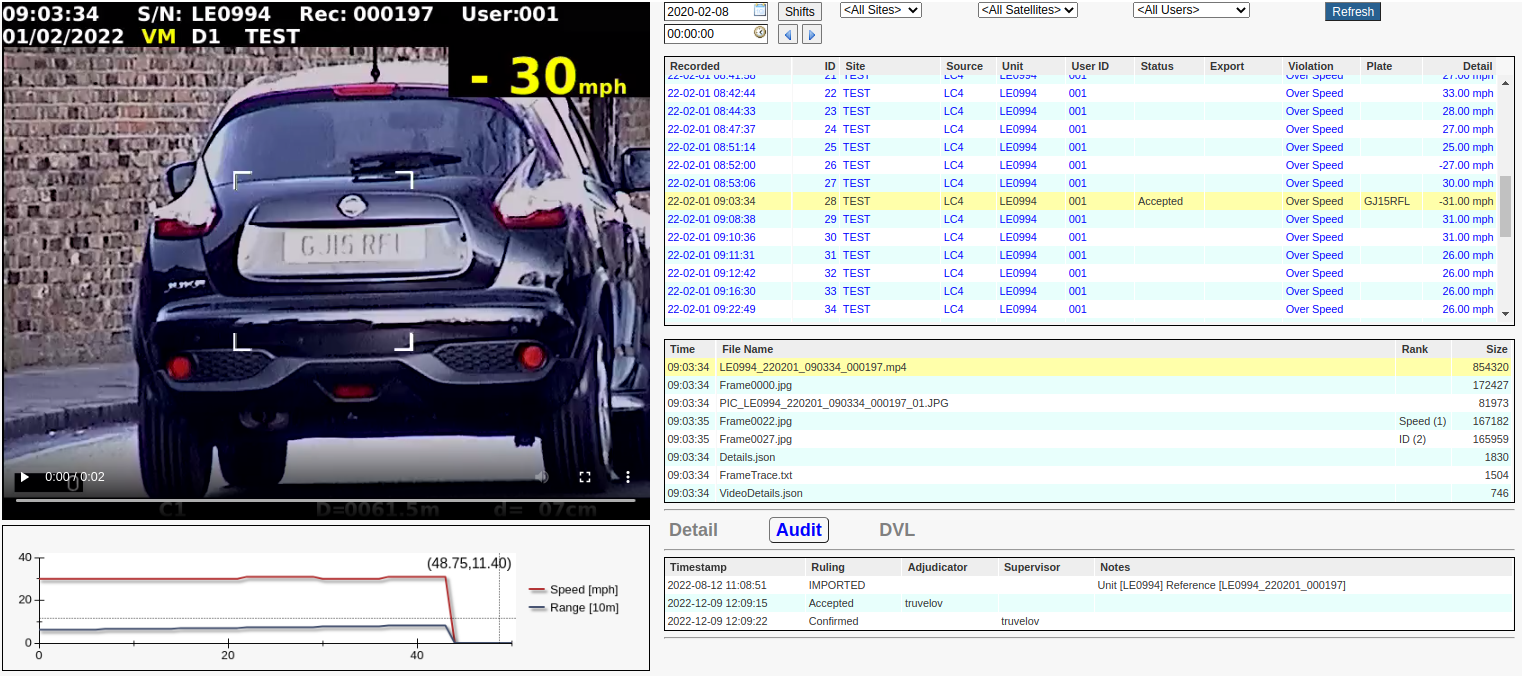
Main Image
Depending on what item has been selected in the Evidence List, this may be any one of the following ...
A video clip as shown above.
A static image or extracted video frame.
A text box containing (but not limited to) Violation Details, Video Details, and Frame Trace.
Static Image Navigation
When a Static Image is displayed, it is possible to navigate to other related images using a series of single-clicks and/or double-clicks on the image itself. The source of those images will be either the Evidence List or the Video Chart depending upon which is currently highlighted by a red border. A single-click will take you forward in the sequence, while a double-click will take you backwards. You will find another explanation here as it applies to the Adjudicator - while not identical, the principle is the same.
Filter Controls
This page also contains the same filtering controls that are available to Adjudicators and Supervisors, but with the additional ...
Time Picker control used to refine the start date and time of the listed violations.
Shift Button used to view the details of any shifts after the selected date and that satisfy the currently selected filter. Note that if no shifts are present then you will get a message to that effect. Conversely, if multiple shifts are present, then you will be presented with a dialog box that will look something like this ...
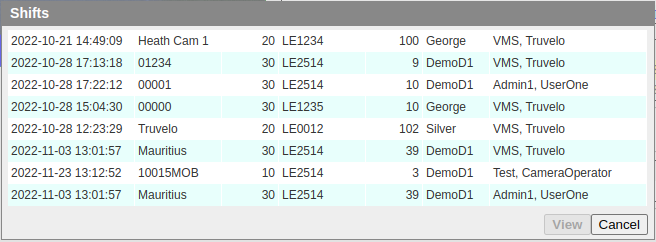
Double-clicking a shift entry or clicking the 'View' button will present you with the details of the selected shift. For example ...
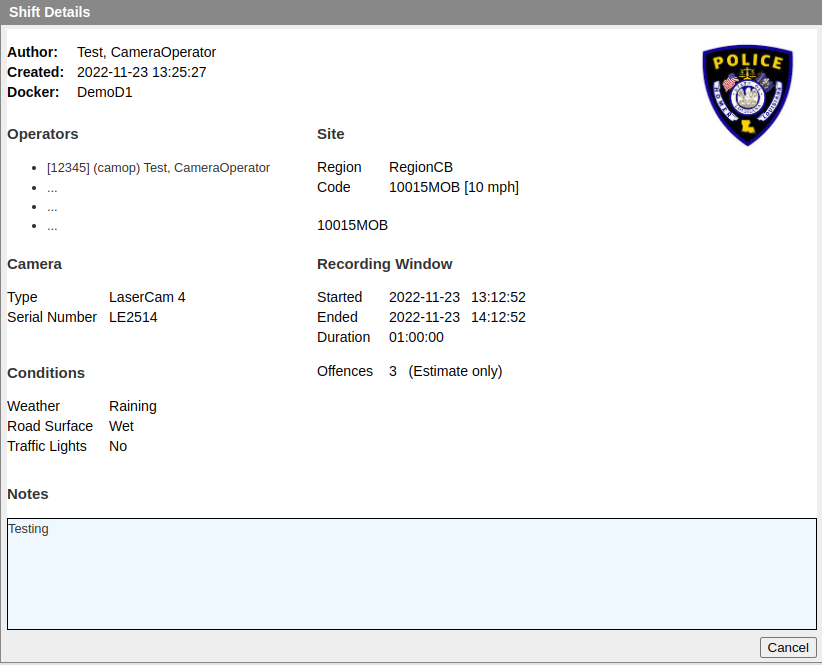
Note that the displayed logo and layout are customizable.
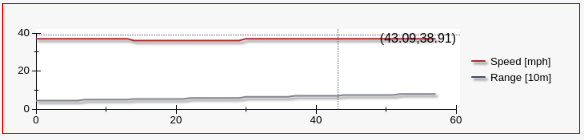
Speed and Range Chart
The Speed and Range Chart is described here.
Violation List
This list is fairly self-evident. Its purpose is to allow the user to select a particular violation and to view it's associated details. You will notice that the text colour may vary from line to line:
Gray denotes violations that have been 'Rejected' and confirmed by a 'Supervisor'.
Blue denotes violations that have either not been adjudicated or nor not yet checked by a 'Supervisor'.
Black denotes violations that have been processed and exported.
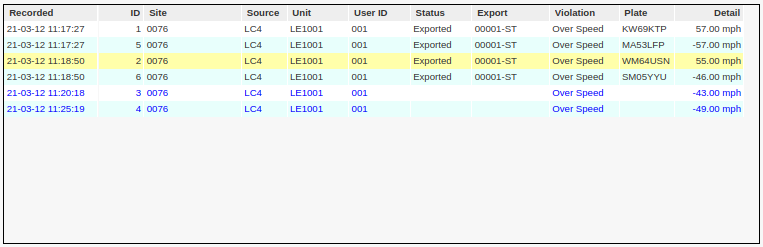
Recorded: The date and time at which the violation was recorded. This should not be confused with the data and time at which the violation was imported into the VMS system.
ID: The unique system defined ID of the violation. These are allocated sequentially when the violations are imported.
Site: The associate site code of the geographic location at which the violation was recorded.
Source: The recording equipment source type.
Unit: The serial number of the recording equipment.
User ID: The ID of the individual responsible for making acquiring the violation - also known as the camera 'Operator ID'.
Status: The VMS status of the violations. See below.
Export: The Export Batch Name in which this violation was exported. This will be blank until the violation has been exported.
Violation: The type of violation.
Plate: The vehicle registration number of the associated vehicle.
Detail: The details for this violation type. For speeding offences, it will be the recorded speed.
Status Values
The 'Status' column denotes a combination conditions, summarized as follows:
Stage |
Description |
<Blank> |
Unprocessed. |
Busy |
Currently being processed by an adjudicator. |
Pending |
Pending review by the supervisor. |
Reviewing |
Busy being reviewed by the supervisor |
Accepted |
Accepted by an Adjudicator. Blue then it is still to be checked by a 'Supervisor' - otherwise Black. |
Rejected |
Rejected by an Adjudicator. Blue then it is still to be checked by a 'Supervisor' - otherwise Black. |
Overruled |
The ruling has been overruled by the supervisor. |
Exported |
Completed processing and has been exported. |
To summarize: Black or Gray indicate that no further action is required by a user (Adjudicator or Supervisor).
Evidence List
This is a list of all the items of evidence associated with the selected violation. All of these files are saved in the LFR (Large File Repository).
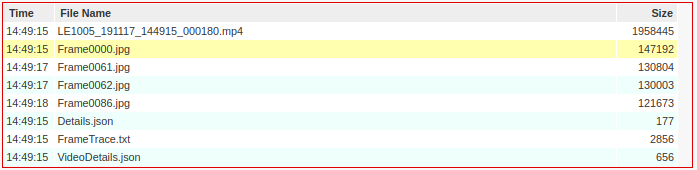
The items in this example include ...
An MP4 video clip (LE1011_191108_132854_000044.mp4).
Three extracted frame images (Frame0000.jpg, Frame0034.jpg, and Frame0053.jpg) from the video clip.
A JSON Details file sourced (and possibly reformatted) from the recording device (camera).
A Frame Trace (FrameTrace.txt), listing all the video frames and their extracted (via OCR) details.
A JSON VideoDetails document (VideoDetails.json) containing a violation summary, and all the video technical details, such as frame rate, codex, etc.
Occasionally an OCR Repairs file (OcrRepairs.txt) will be listed if the OCR engine processing experienced difficulties during the violation import process.
Samples of the contents of some of these files are shown below.
Sample 'Details'
{
    "ApiVersion": "1.0.0",
    "Header": {
        "ActiveSatellites": "--",
        "BatteryVoltage": "368",
        "CameraWorkingMode": "3",
        "CameraZoomMode": "0",
        "CaptureSpeedCar": "005",
        "Compass": "2",
        "DVRRecordState": "1",
        "Date": "191108",
        "Distance": "0468",
        "EventNo": "00000716",
        "GPSEast": "------------",
        "GPSNorth": "-----------",
        "Inclination": "1",
        "LaserBeamState": "1",
        "LocationCode": "111555",
        "MultipleSpeedLimit": "0",
        "OperatorId": "000001",
        "RangeDecimalPoint": "3",
        "RecordName": "LE1011_191108_132854",
        "RecordNumber": "000044",
        "SpeedLimit": "013",
        "SpeedUnit": "2",
        "TargetDirection": " ",
        "TargetSpeed": "052",
        "Time": "132854",
        "Transfer": "0",
        "UserType": "2",
        "WorkingMode": "2"
    },
    "Records": [
        [
            "",
            "2019-11-08 13:28:54",
            468,
            52
        ],

        ....


        [
            "",
            "2019-11-08 13:28:56",
            310,
            51
        ]
    ]
}
Sample 'Frame Trace'
This is a textual representation of the displayed Speed and Range Chart, and is useful when attempting to diagnose an OCR translation error. Unfortunately such errors are sometime unavoidable due to a technical problem (or electronic 'noise') on the original recording equipment. This is very rare, but does occasionally occur, and is described more fully below.
FrameNo | Time | Range[Meters] | Speed[Mph] | OverSpeed
0 | 13:28:54 | 468 | 52 | N
1 | 13:28:54 | 468 | 52 | N
2 | 13:28:54 | 468 | 52 | N
3 | 13:28:54 | 468 | 52 | N
4 | 13:28:54 | 468 | 52 | N
5 | 13:28:54 | 468 | 52 | N
6 | 13:28:54 | 468 | 52 | N
7 | 13:28:54 | 446 | 52 | N
8 | 13:28:54 | 446 | 52 | N
9 | 13:28:54 | 446 | 52 | N
10 | 13:28:54 | 446 | 52 | N
11 | 13:28:54 | 446 | 52 | N
12 | 13:28:55 | 446 | 52 | N
13 | 13:28:55 | 446 | 52 | N
14 | 13:28:55 | 446 | 52 | N

   ...

49 | 13:28:56 | 333 | 51 | N
50 | 13:28:56 | 333 | 51 | N
51 | 13:28:56 | 333 | 51 | N
52 | 13:28:56 | 333 | 51 | N
53 | 13:28:56 | 310 | 51 | N
54 | 13:28:56 | 310 | 51 | N
55 | 13:28:56 | 310 | 51 | N
Sample 'VideoDetails'
This is a JSON document containing ...
- A violation summary constructed during OCR analysis of the video.