
Dockers
The Dockers panel displays system the set of configured VMS Dockers.
VMS Dockers are remote (often mobile) units that fulfill a variety of functions, including ...
Uploading recorded violation video evidence (e.g. LaserCam4 and Laser Witness).
Uploading 'Shift' documents, also known as field sheets.
- Camera (LC4) configuration of 'sites' and 'users'.
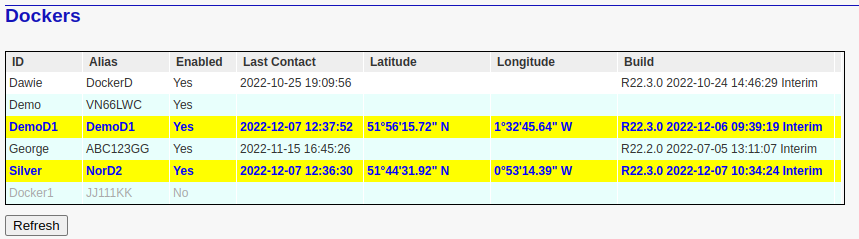
This table includes the following headings:
ID: A unique manually defined docker name.
Alias: An alternative (unique) name by which the docker may be identified. For instance, this may be the registration number (plate) of the vehicle to which the docker has been permanently assigned.
Enabled: Indicates the 'Enabled' status of the docker. Disabled dockers are barred from downloading account and site data from the VMS Server.
Last Contact: The date and time of the docker's most recent contact. If the contact was very recent (usually within the last 10 minutes), then this is highlighted by the blue text and yellow background.
Latitude: The geographic latitude of the docker at last contact.
Longitude: The geographic longitude of the docker at last contact.
Build: The software build details of the docker.